
SMS Consent and Message Flow
Last updated: February 23, 2026
How End Users Opt In
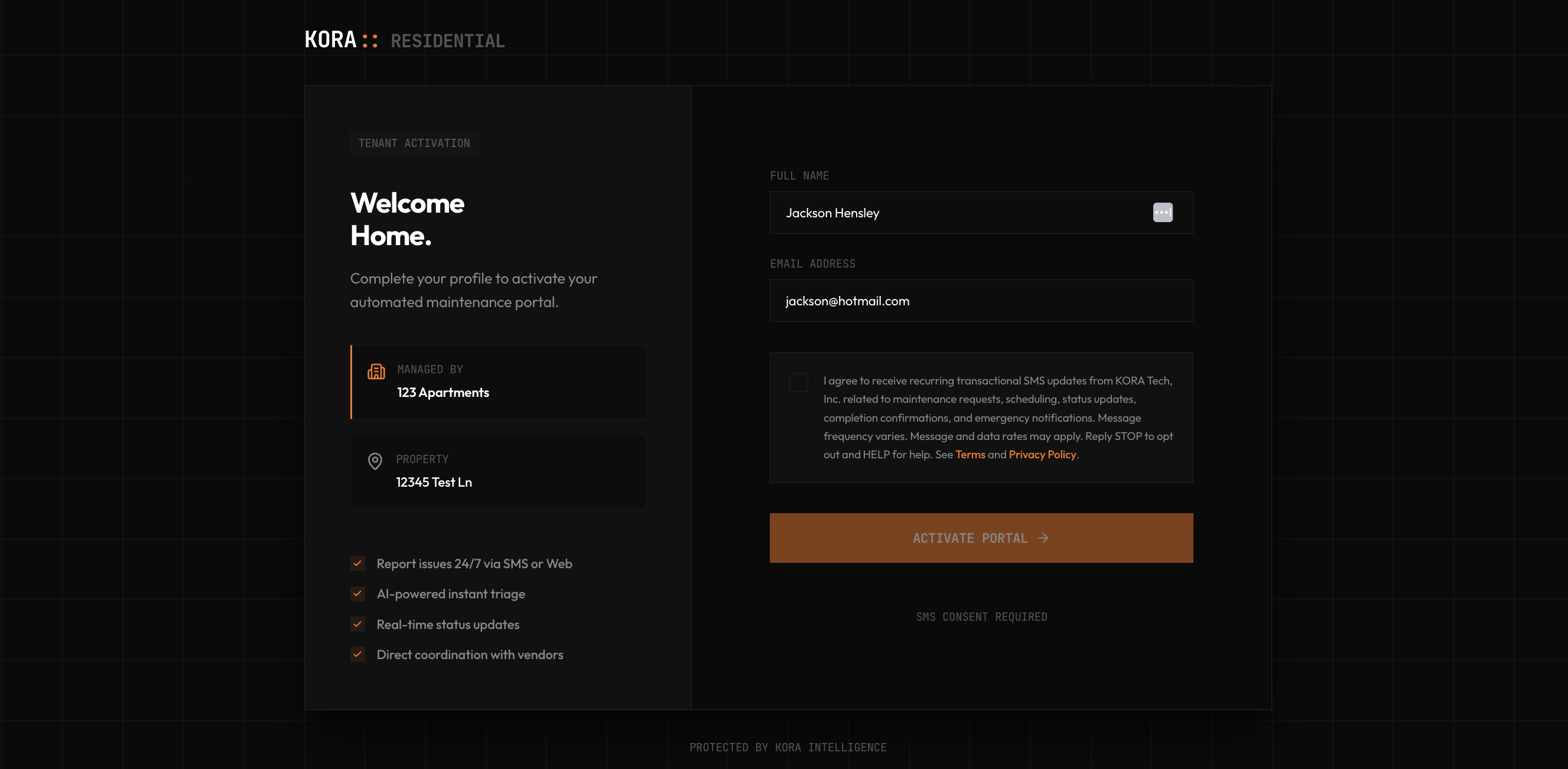
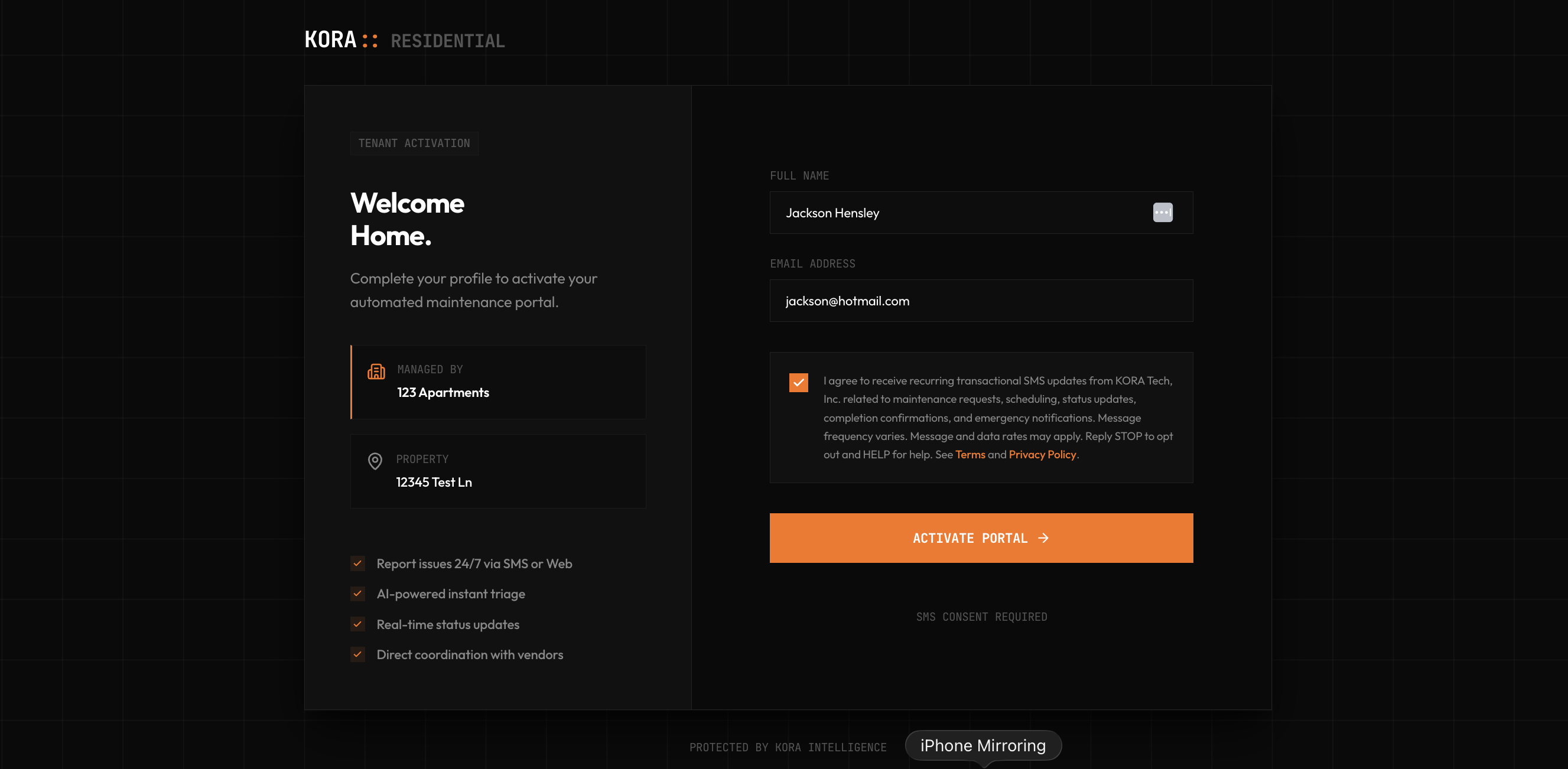
Tenants and maintenance vendors are invited to the platform via Email. The Property Manager triggers a welcome email containing a secure, unique link to their Kora portal. The user clicks the link in their email, arrives at the Kora web app, and affirmatively confirms their consent by checking an unchecked SMS consent checkbox before their account activates. Absolutely NO SMS messages are sent to the user until they complete this web form via the emailed link.
Both pages render the exact same consent UI used in production, with placeholder data. No data is submitted. Real activation links are one-time token-gated URLs sent by property managers.
Exact Consent Language
I agree to receive recurring transactional SMS updates from KORA Tech, Inc. related to maintenance requests, scheduling, status updates, completion confirmations, and emergency notifications. Message frequency varies. Message and data rates may apply. Reply STOP to opt out and HELP for help. See Terms and Privacy Policy.
Consent checkboxes are unchecked by default and must be affirmatively selected before SMS enrollment can be completed.
Program Details
- Program: KORA Maintenance Alerts
- Use case: transactional maintenance operations messages (non-promotional)
- Frequency: varies based on active tickets and incidents
- Opt out: Reply STOP
- Help: Reply HELP or email [email protected]
- Message and data rates may apply
Policy Links
- Terms of Service: https://getkoratech.com/terms
- Privacy Policy: https://getkoratech.com/privacy
Public Verification Artifacts
The tenant activation and vendor consent flows are token-gated (invite-only links), so live URLs are not publicly indexable. The high-resolution screenshots below document the exact consent UI shown to end users in both flows. Each image shows the full consent checkbox, disclosure text, and submit button as rendered in the live product. Click any image to open full resolution in a new tab.
- Checkboxes are unchecked by default — users must affirmatively check before the submit button activates.
- Disclosure text includes: “Message and data rates may apply. Reply STOP to opt out.”
- Terms of Service and Privacy Policy links are visible inline on the consent form.
![Vendor consent page at /vendor-consent/[token] showing unchecked SMS consent checkbox with full disclosure text, Terms of Service and Privacy Policy links visible](/compliance/sms-consent-3.png)
/vendor-consent/[token]. Checkbox is unchecked by default. Same disclosure language and policy links as tenant flow.![Vendor consent page at /vendor-consent/[token] showing checked SMS consent checkbox and activated submit button immediately before form submission](/compliance/sms-consent-4.png)
Mobile Data Sharing
No mobile opt-in data is shared with third parties for marketing/promotional purposes. Text messaging originator opt-in data and consent are excluded from third-party sharing.